
ChatGPT
ChatGPT is an AI assistant for writing, learning, research, problem solving, and creative tasks. Learn practical skills with AI Academy and discover useful workflows in our AI Library.
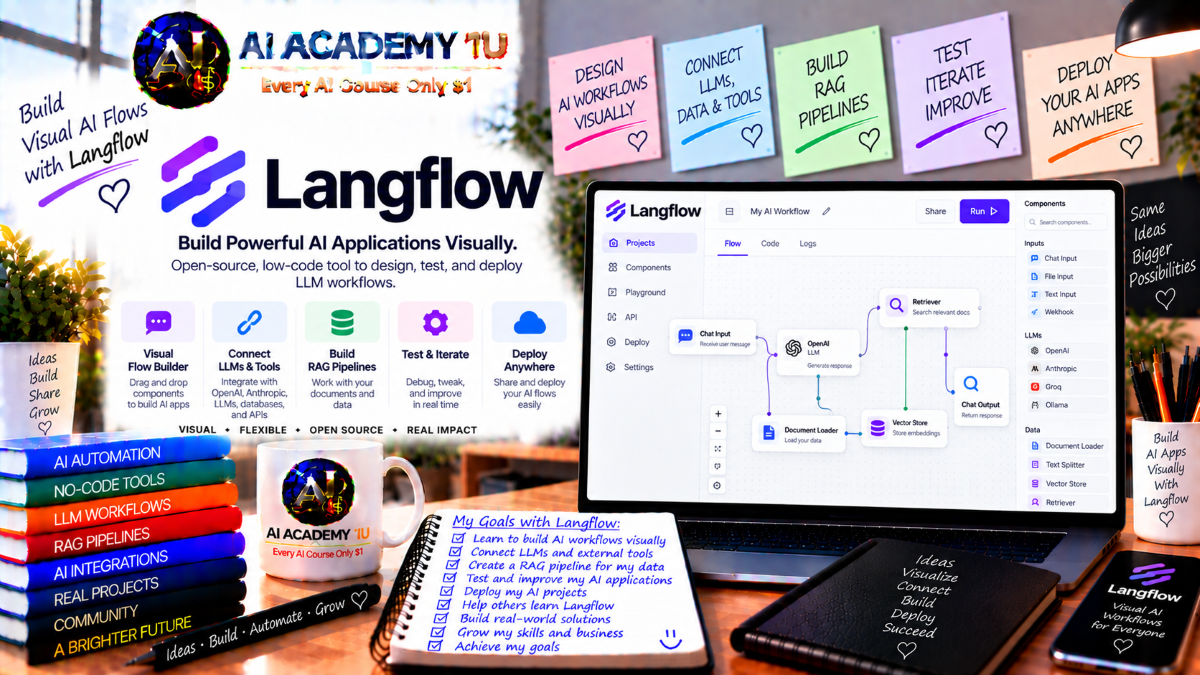
EXPLORE AI LIBRARYLangflow AI is a visual platform for building intelligent agents and language model workflows. Learn practical skills with AI Academy and discover useful workflows in our AI Library.

Explore all lessons in this catalogue and start learning at your own pace.
▶
1. What Is Langflow? ❌
AI Academy 1U introduces Langflow as a visual framework for building model workflows, retrieval systems, and agentic applications while combining no-code convenience with developer-level extensibility.
▶
2. Understand Flows, Components and Connections ❌
AI Academy 1U explains how Langflow flows are built from connected components and how dependencies determine execution order across a visual graph.
▶
3. Install and Set Up Langflow ❌
AI Academy 1U guides learners through preparing a Langflow environment, launching the platform, creating an initial project, and confirming that the workspace is ready for development.
▶
4. Explore the Langflow Interface ❌
AI Academy 1U introduces the Langflow interface, including Projects, the visual editor, component sidebar, Playground, settings, and key areas used to create and manage flows.
▶
5. Understand Projects and Flow Organization ❌
AI Academy 1U teaches learners how Langflow projects organize related flows, making larger workflow collections easier to manage, reuse, maintain, and navigate.
▶
6. Create Your First Blank Flow ❌
AI Academy 1U guides learners through creating a Langflow workflow from a blank canvas and adding the initial components needed to begin building functional logic.
▶
7. Build a Basic Prompt-to-LLM Flow ❌
AI Academy 1U teaches learners how to connect Chat Input, Prompt, a language model, and Chat Output to understand basic data movement through Langflow.
🔒
8. Understand Component Inputs and Outputs ❌
AI Academy 1U explains how Langflow component ports, data types, required inputs, and outputs determine which components can be connected successfully.
🔒
9. Configure Model Providers ❌
AI Academy 1U teaches learners how to configure model providers, credentials, and model selections so Langflow workflows and agents can access suitable language models.
🔒
10. Test a Flow in Playground ❌
AI Academy 1U demonstrates how to run Langflow workflows in Playground, inspect results, test inputs, and evaluate how configuration changes affect flow behavior.
🔒
11. Import, Export and Duplicate Flows ❌
AI Academy 1U teaches learners how to import, export, duplicate, and reuse Langflow flows for sharing, experimentation, backup, and faster workflow development.
▶
12. Understand Prompt Components ❌
AI Academy 1U explains how Langflow Prompt components combine instructions and dynamic variables before sending structured input to a connected model.
🔒
13. Build Dynamic Prompt Templates ❌
AI Academy 1U teaches learners how to combine user input, variables, and reusable instructions to create flexible and structured prompt templates in Langflow.
🔒
14. Compare and Switch Language Models ❌
AI Academy 1U guides learners through switching model providers and models in Langflow to compare response quality, latency, tool capabilities, and workflow suitability.
🔒
15. Control Model Parameters ❌
AI Academy 1U explains how model parameters such as temperature and related settings influence creativity, consistency, and response behavior inside Langflow workflows.
🔒
16. Build Structured AI Output Flows ❌
AI Academy 1U teaches learners how to generate structured outputs such as JSON so model responses can be reliably passed into later processing steps.
▶
17. Understand Data Types in Langflow ❌
AI Academy 1U explains common Langflow data types, including Message, JSON, Table, and files, and how they move between compatible components.
🔒
18. Load and Process Files ❌
AI Academy 1U teaches learners how to load text, PDF, and other documents into Langflow and prepare their contents for downstream model or data processing.
🔒
19. Transform JSON Data ❌
AI Academy 1U teaches learners how to extract, normalize, restructure, and pass selected JSON fields through Langflow workflows for controlled downstream processing.
🔒
20. Work with Tables ❌
AI Academy 1U explains how to process row-and-column data using Langflow Table structures and move tabular information between processing and model components.
🔒
21. Build a Document Processing Flow ❌
AI Academy 1U guides learners through building a complete Langflow document pipeline that loads content, extracts information, processes it with a model, and produces structured results.
▶
22. Understand RAG ❌
AI Academy 1U introduces retrieval-augmented generation and explains why Langflow applications use retrieval when model responses must be grounded in private or specialized documents.
🔒
23. Understand Embeddings ❌
AI Academy 1U explains how embeddings convert content into numerical vectors that enable semantic similarity search across document collections.
🔒
24. Connect a Vector Store ❌
AI Academy 1U teaches learners how to configure and connect a vector store component for storing and retrieving semantically searchable information.
🔒
25. Ingest Documents into a Vector Store ❌
AI Academy 1U teaches learners how to split, embed, and store document content in a vector store so it becomes searchable by semantic meaning.
🔒
26. Retrieve Relevant Context ❌
AI Academy 1U teaches learners how to query a Langflow vector store and return relevant passages that provide grounded context for model responses.
🔒
27. Build a RAG Chatbot ❌
AI Academy 1U guides learners through building a Langflow chatbot that retrieves relevant document context before generating grounded conversational responses.
🔒
28. Improve RAG Quality ❌
AI Academy 1U teaches learners how to improve Langflow RAG results by refining document splitting, retrieval settings, prompt structure, and context selection.
▶
29. Understand Langflow Agents ❌
AI Academy 1U explains how Langflow Agents differ from standard model responses by reasoning about requests and choosing tools when actions or external context are required.
▶
30. Build Your First Agent ❌
AI Academy 1U guides learners through configuring a Langflow Agent component, selecting a model, writing instructions, and testing initial agent behavior.
🔒
31. Write Better Agent Instructions ❌
AI Academy 1U teaches learners how to define agent roles, goals, boundaries, responsibilities, and expected outputs to produce more stable Langflow Agent behavior.
🔒
32. Give Components to an Agent as Tools ❌
AI Academy 1U teaches learners how to enable suitable Langflow components as tools and connect them to an Agent for controlled tool selection and execution.
🔒
33. Build Multi-Tool Agents ❌
AI Academy 1U teaches learners how to give Langflow Agents multiple tools for search, retrieval, external services, and other actions based on user intent.
🔒
34. Use Another Agent as a Tool ❌
AI Academy 1U demonstrates how one Langflow Agent can be connected as a tool for another agent to create more specialized multi-agent behavior.
🔒
35. Project: Build an Agentic Business Assistant ❌
AI Academy 1U guides learners through building a Langflow business assistant that combines agent instructions, multiple tools, enterprise context, and controlled task execution.
▶
36. Understand Chat Memory ❌
AI Academy 1U explains why chat memory is important for maintaining context across multiple turns in Langflow assistants and agent conversations.
🔒
37. Store and Retrieve Message History ❌
AI Academy 1U teaches learners how to store and retrieve conversation history so Langflow models and agents can use previous exchanges as context.
🔒
38. Design Context Windows Carefully ❌
AI Academy 1U teaches learners how to balance useful conversation history against token usage, cost, and accuracy when designing Langflow context windows.
🔒
39. Build a Context-Aware Assistant ❌
AI Academy 1U guides learners through building a Langflow assistant that combines memory, instructions, and knowledge to maintain continuity between conversations.
▶
40. Understand API-Based Langflow Integrations ❌
AI Academy 1U explains how Langflow uses API and HTTP components to connect workflows with external services and business systems.
🔒
41. Call an External REST API ❌
AI Academy 1U teaches learners how to send REST requests, configure parameters, receive responses, and use external API data inside Langflow flows.
🔒
42. Connect Business Services to a Flow ❌
AI Academy 1U teaches learners how to connect CRM platforms, data services, and other business systems to Langflow workflows.
🔒
43. Use API Results as Agent Tools ❌
AI Academy 1U teaches learners how to expose external API capabilities to Langflow Agents so agents can call services dynamically when required.
🔒
44. Build an Integrated AI Workflow ❌
AI Academy 1U guides learners through building a Langflow workflow that combines model reasoning, external APIs, and processing logic into one integrated application.
▶
45. Understand MCP in Langflow ❌
AI Academy 1U introduces MCP and explains how it standardizes access to external tools and resources for Langflow agents and connected applications.
🔒
46. Use Langflow as an MCP Client ❌
AI Academy 1U teaches learners how to connect Langflow to external MCP servers so Agents can access tools provided by those servers.
🔒
47. Use Langflow as an MCP Server ❌
AI Academy 1U teaches learners how to expose Langflow flows as MCP-accessible tools that compatible external clients can discover and invoke.
🔒
48. Connect Langflow Flows as MCP Tools ❌
AI Academy 1U teaches learners how existing Langflow flows can become reusable MCP tools for other agents, applications, and connected workflows.
🔒
49. Build an MCP-Enabled Agent System ❌
AI Academy 1U guides learners through building a Langflow Agent system that consumes external MCP tools and exposes useful workflow capabilities to outside systems.
▶
50. Understand Human-in-the-Loop ❌
AI Academy 1U explains why Langflow workflows may require human review before sensitive tool calls, actions, or high-impact decisions are allowed to continue.
🔒
51. Require Approval for Agent Tools ❌
AI Academy 1U teaches learners how to pause Langflow workflows before critical tool actions and continue execution only after explicit human approval.
🔒
52. Understand A2A Agent Communication ❌
AI Academy 1U introduces agent-to-agent communication and explains how Langflow agents can be published, discovered, and called by other compatible agents.
🔒
53. Build a Human-Governed Agent Flow ❌
AI Academy 1U guides learners through creating a Langflow Agent workflow with tool execution, human approval gates, checkpoints, and controlled continuation.
▶
54. Understand Custom Components ❌
AI Academy 1U explains when built-in Langflow components are insufficient and how custom components can provide specialized logic and integration capabilities.
🔒
55. Build a Simple Custom Component ❌
AI Academy 1U guides learners through creating a basic Langflow custom component with defined inputs, processing logic, and output behavior.
🔒
56. Package Reusable Business Logic ❌
AI Academy 1U teaches learners how to convert repeated business rules and integration logic into reusable Langflow components for consistent workflow development.
🔒
57. Secure Custom Component Execution ❌
AI Academy 1U explains security considerations for custom component execution and teaches learners how to reduce risks when running custom code in Langflow environments.
▶
58. Understand Langflow Assistant ❌
AI Academy 1U introduces Langflow Assistant as an interactive helper for understanding, building, inspecting, and modifying flows inside the development environment.
🔒
59. Build and Modify Flows with AI Assistance ❌
AI Academy 1U teaches learners how to use Langflow Assistant to add components, modify workflow structure, inspect flows, and explain configuration choices.
🔒
60. Use External Coding Agents with Langflow ❌
AI Academy 1U teaches learners how external coding agents can interact with Langflow through MCP to inspect, modify, build, and run workflows.
🔒
61. Combine Visual and AI-Assisted Development ❌
AI Academy 1U teaches learners how to combine Langflow’s visual canvas with assistant-driven and code-assisted development for more complex production workflows.
▶
62. Test Flows Systematically ❌
AI Academy 1U teaches learners how to test Langflow flows with normal inputs, missing values, external service failures, and unexpected model responses.
🔒
63. Debug Components and Connections ❌
AI Academy 1U teaches learners how to trace Langflow workflow problems through component inputs, configuration, connections, and upstream data.
🔒
64. Use Flow Versioning ❌
AI Academy 1U teaches learners how flow versioning supports safer changes, experimentation, rollback, and controlled maintenance of production Langflow workflows.
🔒
65. Monitor Token Usage and Model Costs ❌
AI Academy 1U teaches learners how to review token consumption and model usage to understand and optimize the operating cost of Langflow workflows.
▶
66. Understand Langflow Deployment Options ❌
AI Academy 1U explains common Langflow deployment approaches, including local development, server environments, and production infrastructure for scalable application hosting.
🔒
67. Expose a Flow Through the Langflow API ❌
AI Academy 1U teaches learners how to expose a Langflow flow through an API so external applications can use it as a backend service.
🔒
68. Project: Enterprise RAG Assistant ❌
AI Academy 1U guides learners through building an enterprise Langflow RAG assistant combining document ingestion, vector storage, retrieval, agent reasoning, memory, and human review.
🔒
69. Final Project: Production Langflow Agentic System ❌
AI Academy 1U guides learners through building a production-ready Langflow agentic system combining flows, models, prompting, data, RAG, tools, memory, APIs, MCP, approvals, interoperability, testing, versioning, and deployment.
ChatGPT is an AI assistant for writing, learning, research, problem solving, and creative tasks. Learn practical skills with AI Academy and discover useful workflows in our AI Library.
EXPLORE AI LIBRARYCanva is a design platform for creating graphics, presentations, videos, and social media content. Learn practical design skills with AI Academy and explore creative workflows in our AI Library.
EXPLORE AI LIBRARYCapCut is a video editing platform for creating and enhancing videos with AI-powered tools, effects, captions, and templates. Learn practical skills with AI Academy and explore workflows in our AI Library.
EXPLORE AI LIBRARYGoogle Gemini is Google’s assistant for research, writing, reasoning, images, and productivity. Learn practical skills with AI Academy and discover useful workflows in our AI Library.
EXPLORE AI LIBRARYLearn Google Veo with AI Academy 1U and create cinematic AI videos from text and images using powerful video generation, camera controls, visual storytelling, and creative production techniques.
EXPLORE AI LIBRARYElevenLabs AI is a voice platform for text to speech, narration, and voice creation. Learn practical skills with AI Academy and discover useful workflows in our AI Library.
EXPLORE AI LIBRARYClaude AI is an assistant for writing, document analysis, reasoning, and coding. Learn practical skills with AI Academy and discover useful workflows in our AI Library.
EXPLORE AI LIBRARYVideoGen AI empowers creators to produce engaging videos faster with AI-powered tools. Learn practical workflows, creative techniques, and production strategies with AI Academy 1U to create professional video content efficiently.
EXPLORE AI LIBRARYHeyGen AI is an avatar video platform for presentations, narration, and multilingual communication. Learn practical skills with AI Academy and discover useful workflows in our AI Library.
EXPLORE AI LIBRARYMicrosoft Copilot is Microsoft’s assistant for productivity, writing, research, and workplace tasks. Learn practical skills with AI Academy and discover useful workflows in our AI Library.
EXPLORE AI LIBRARY







